 Luma
Luma is a Mac menu-bar app that warms and dims the screen at night. It follows a sunset-to-sunrise schedule and gives me one-click pause and reset.
brew install --cask chountalas/tap/luma- Cuts blue light
- warmer night screen
- Sunset → sunrise
- automatic schedule
- One-click reset
- back to true color
- Native arm64
- no Rosetta / no server
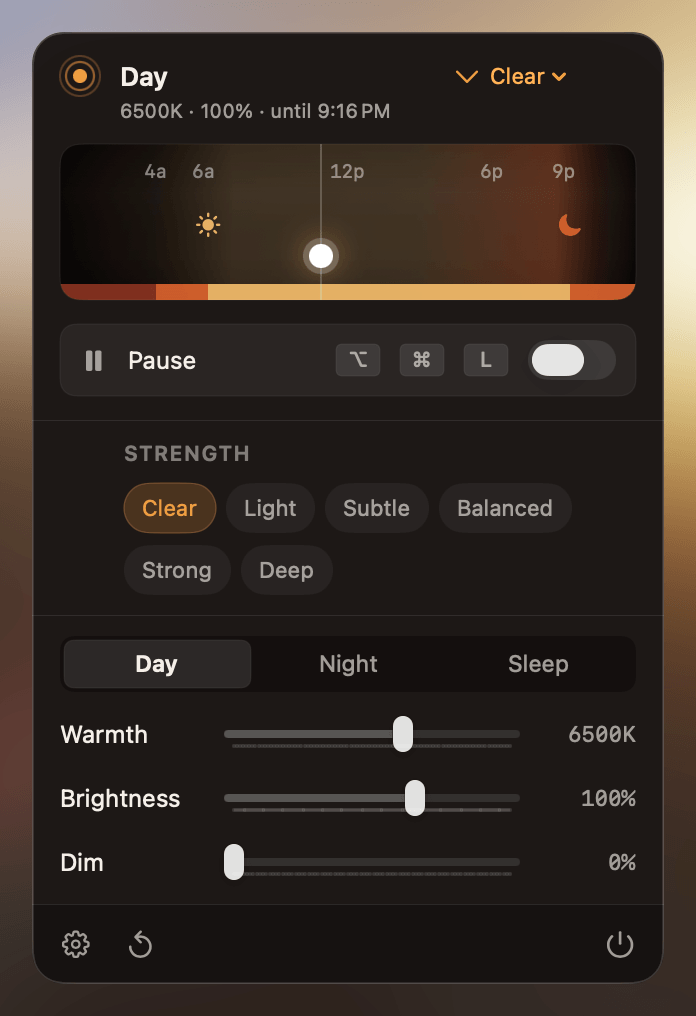
Everything I touch day to day is in this panel.
Warm and dim the screen from the menu bar.
Schedule
Luma works out sunrise and sunset from a latitude and longitude I type in, or follows a manual time window. It never asks for location access.
sun position · manual windowPick a strength
A preset sets the Day, Evening, and Bedtime profiles together. Touching a slider switches to Custom instead of overwriting the preset.
8 presets · CustomApply
CoreGraphics gamma tables shift each display's color curve. A display that rejects them gets a click-through overlay, and the menu bar says so.
gamma tables · overlay fallbackPause or reset
Pause fades back to neutral. Reset restores true color at once, for screenshots or design work.
back to true colorWhat runs the display, and what I took back out.
Warmth through the display curve.
Luma changes the color curve for each online display instead of laying a filter over the desktop. It's native arm64, so nothing runs through Rosetta.
CoreGraphics gamma tablesCalmer transitions.
Profile changes used to jump 35% and then step to the target. They now follow an eased 1.6-second ramp, and color temperature moves in mireds, which tracks how warm light looks to the eye.
1.6-second ramp · miredsPresets from real evenings.
Eight presets run from Clear to Late Night. Clear and Light exist because the first version jumped too quickly from neutral to warm.
Clear to Late Night · CustomSurvives display changes.
Luma reapplies the gamma table when a display reconfigures or the screen unlocks. It only drops to the overlay after three gamma failures in a row.
reconfigure · unlock · overlayI took the global hotkeys back out.
Their defaults collided with window managers and kept firing pause and reset by accident. Pause and reset stay in the panel.
removed in 0.1.9The repo and the signed release.
Public repository for the native macOS menu-bar app, including the source and release downloads.
public · Homebrew or DMG`brew install --cask chountalas/tap/luma` installs the latest signed build.
macOS 14+ · Apple SiliconSigned and notarized arm64 DMG for the current public release.
arm64 only · signed + notarized